1
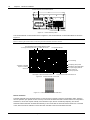
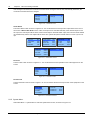
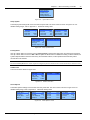
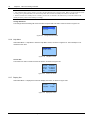
30 Chapter 5 Micro-Processing Controller Active: Hi Temp 2012/01/01 1/8 00:00 Figure 5-9 Active Alarm screen Note 1. The latest alarm SN is the biggest number. Press the Up or Down button to scroll through the alarm status records if more than one alarm is activated. 2. The alarm status records will be automatically cleared upon system power-off. Alarm History The Alarm History menu is used to view the historical alarm record of the AC unit, including XX/YY, alarm type, alarm start time and alarm end time (if the alarm is not ended, the screen displays Not Ended Yet), as shown in Figure 5-10. XX is the serial number of the historical alarm record and YY is the total number of the historical alarm records. History: Hi Temp 2012/01/01 2012/01/01 1/4 00:00 01:22 Figure 5-10 Alarm History screen Note 1. Press the Up or Down button to scroll through the historical alarm records if more than one alarm is activated. 2. Up to 200 historical alarm records can be stored. They will not be cleared upon system power-off. Alarm Setting The Alarm Setting settings will not be lost when the power fails. The Alarm Setting screen is shown in Figure 5-11. For detailed setting ranges, refer to Appendix 2 Parameter Setting Table. Note It is not recommended to change the defaults. If the change is necessary, change them under the guidance of the trained professionals. 30.0° C 18.0° C 60.0% 40.0% Air Diff Hi Press Lo Press Dschg Temp 15.0° C ENAB ENAB ENAB Hi Temp Lo Temp Hi Hum Lo Hum Hum Fail Temp Snsr HP Lock LP Lock ENAB ENAB ENAB ENAB Dschg Lock Water UF Power Lost Power OV ENAB ENAB ENAB ENAB Power LV Power FS Power PL Power PR Customer1 T/H Card Air Lost Customer2 ENAB ENAB ENAB ENAB Press Snsr Hum Snsr Air Lost Snsr Cstmr1Polar ENAB ENAB ENAB NC Cstmr2Polar ComAlmPolar ClearAlmHis Hi Temp Lo Temp Hi Hum Lo Hum Figure 5-11 Alarm Setting screen New Liebert_DM Series Air Conditioner User Manual ENAB ENAB ENAB ENAB ENAB ENAB ENAB ENAB NC NO N