1
Icom radio having an 8-pin
round MIC socket. I thought the
MFJ-1251 would provide a good
basis for my external keypad.
At the ARRL Centennial
Convention in Hartford I purchased an MFJ-1251 adapter
from MFJ’s own booth. The price
was $29.95. Next day I purchased a packet of four momentary pushbutton switches from
Radio Shack — part number
275-1547, price $3.99. These
are the ‘normally open’ type.
Total so far — $33.94.
Radio Shack
momentary pushbutton switches.
The right connections
The first task was to evaluate the circuitry of MFJ’s
Universal Microphone Adapter. MFJ provides an
Instruction Manual containing the schematic plus connection diagrams for various combinations of microphone plug and radio manufacturer. My plan was to
use the Icom radio’s original HM-36 microphone with
the matching 8-pin round MIC socket on the Icom
transceiver. Unfortunately that straight-through combination is not included in the manual. (Not unexpected
though!)
Careful examination of the schematic showed that
MFJ selects four wires coming in from the microphone
for MIC-GND, MIC-AUDIO, MIC-PTT plus the 8 volt DC feed
to power any microphone circuitry, labeled THRU/PASS.
These four lines are then connected through appropriate jumpers
to the correct
pin-numbers
on the radio’s
“MIC” connector for:
RADIO-MICGND, RADIOMIC-AUDIO,
RADIO-PTT
and the
THRU/PASS
+8V DC line.
The black
ovals in the
diagram
alongside
MFJ-1251 jumper settings for an Alinco
modular-plug microphone connected to an show the
Icom radio with an 8-pin round MIC input. (default)
jumper settings for an Alinco modular microphone plug connected to an Icom 8-pin round MIC connector.
In order to arrange a “straight through” microphone connection for Icom-to-Icom, all you have to
do is combine
the left-hand
side of the
diagram for
your microphone connector with
the right
hand side of
the diagram
for your
radio’s MIC
connector.
See the
accompanying picture
Modified jumper settings for an Icom 8-pin
for an
round microphone connected to an Icom
radio with 8-pin round MIC input.
example for
“Icom 8-pin
Round Microphone Connector” combined with the
diagram for an “Icom 8 pin
Round Radio”.
(For readers who
might have an Icom radio
with an 8-pin modular
jack, I have provided a
smaller diagram for “Icom
Modular Microphone ConJumper settings for an Icom
nector” to an “Icom
Modular Radio”. I have not modular microphone plug
connected to an Icom radio
been able to test this
with modular MIC input.
arrangement myself.)
Step-by-step
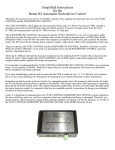
In order to setup an MFJ-1251 adapter for a
straight
through connection, first
move the
jumpers from
their default
settings onto
new headers
as shown in
the appropriate diagram
— see the
photo alongside for an
example. You
MFJ-1251 with modified jumper settings
for an Icom 8-pin round microphone plug should then
carry out a
to an Icom 8-pin round MIC connector.
continuity
check with a multimeter on its ohms position to
confirm the connections from the 8-pin round micro-
PCARA Update, September 2014, page 10