1
9
DINIO7
user ’s manual
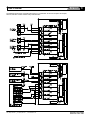
You control the I/O in the same way as if you were using the local SmartMotor™ I/O. For example,
suppose that, in our example, you want to engage relay #3 for 0.1 second. Noting that relay #3
is wired to SmartMotor™ Port D, you would need to set up port E as an output with default high,
and turn it on by commanding the output low:
UD=1
UDO
UD=0
WAIT=407
UD=1
‘Before establishing that port E is an output,
‘predefine it to be default high
‘Define port E as an output
‘Turn on relay by setting port E low
‘Delay 0.1 second
‘Turn relay off by setting port E high
To read an input, you can either stuff its value into a variable or read it directly. Suppose that you
wanted to read the ouput #1 from the PLC. Note that output #1 is connected to SmartMotor™ port B.
You would typically set up port B as an input and then assign the port value to a variable – let’s
say we use variable bb:
UBI
bb=UBI
‘Setup port B as an input
‘stuff the port value of B into the variable bb
You can also read the port directly. This is generally used only when you are using it in an evaluation
expression, such as IF and WHILE. For example, if want to do something if port A is low, the IF
statement would be:
IF UAI
.
.
.
ENDIF
A while statement would look like:
WHILE UAI
.
.
.
ENDIF
For further details about the IF and WHILE statements, please refer to the SmartMotor™ Users
Guide.
Fax: (408) 748 8725
Tel: (408) 748 8721
www.animatics.com