1
6. BLUETOOTH FUNCTION
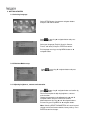
Select SETUP by pressing ◄ or ► navigator buttons
and press ENTER to confirm.
Select
by pressing the ▼ navigator button and
press ENTER to confirm.
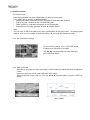
Switch on the Bluetooth device (e.g. mobile phone, PC) that you want to transfer files from and conduct search
for DPF-752. The search will identify frame as “TEXETDPF752” and you will be prompted for a password code.
Type in 0000 and follow any prompts from device. Transmission of selected picture and music files from
Bluetooth device (mobile phone, PC) can now happen. Once the files are transferred, they will be stored in the
internal memory.
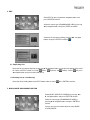
Select MUSIC (MOVIE OR COMBO) by pressing ◄ or ► navigator buttons and press ENTER to confirm.
Select the source type (SD/MMS/MS/XD USB) by pressing ►▼ navigator buttons and press ENTER to confirm.
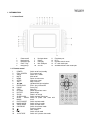
You can also use the remote control to select MUSIC or VIDEO MODE.
NB: Bluetooth on the device is always turned on.
7. TV OUT FUNCTION:
Please switch TV mode to AV mode on your TV set.
Power on digital photo frame and enter main interface.
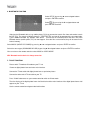
Connect the TV-out cable with digital photo frame as per below picture.
Connect the other end of TV-out cable to your TV
Press “Video” button once on your remote control to switch to AV out mode.
Then the display of the digital photo frame shall be black and the main interface of the digital photo frame shall
appear on your TV set
Use the remote control to navigate to desired functions