1
2.TV PLACEMENT SETUP
TV Stand Installation/Removal
4.
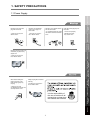
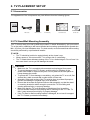
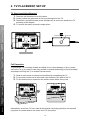
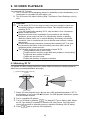
Place the unit face down on a soft surface.
Gently position the glass base to the leg at the bottom of the TV.
Fasten the 4 provided screws (screw size B4x16F) to secure the stand to the TV
according to the diagram.
To remove the stand, reverse the steps above.
Parts & Connections
TV Placement
Setup
1.
2.
3.
TV & Electronic
Programme Guide
Digital Video
Fall Prevention
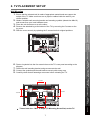
To prevent the TV from tilting forward and falling over to cause damage or injury, please
secure the TV to your table or wall using screws or eyebolts and strong cord (not provided).
An example on fixing the TV to a table is shown below
1.
2.
3.
Install a wood screw or eyebolt into the table that is supporting the TV.
Fix a machine screw into a screw hole near the base in the back of the TV.
Tie the wood screw or eyebolt to the machine screw with a strong cord.
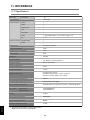
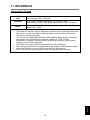
Reference
USB Multimedia
Playback
3D Video Playback
Recording (DVR)
On-Screen Display
(OSD) Menu
Remote Control
Initial Setup &
Input Sources
Screws (4xB4X16F) Screw holes
Alternatively, secure the TV to the wall directly behind it by fixing eyebolts to the wall and
tying them to screws fixed on the centre of the TV back panel.
6