1
User Manual
1. Laser
1. Introduction
The device enables you to control your computer wirelessly from up to
15 meters (48 feet) away, using a Radio Frequency (RF) transmitter that
doesn’t require line of sight to your PC. With its in-built laser pointer, the
LP200 is the ideal tool for presentations, teaching, meetings, speeches,
training etc.
4. Battery Installation
The unit is powered by 1 x CR2032 battery.
Use a coin to unlock the battery compartment cover and remove it.
2. Main Features
Plug and Play for Computer Power Point Presentation
Remote Page Changer and Shortcut Keys
Integrated Red Laser Pointer
Internal Storage for USB Signal Receiver
Remote Control Range: up to 15m
Compatible with Windows 8, 7, Vista, XP, 2000,98, Mac OS & Linux
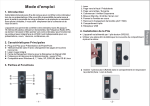
3. Parts & Functions
2
4
Insert 1 x CR2032 battery into the battery compartment with “+”
sign facing up.
1
5
3
7
6
8
9
-1-
-2-
English
This wireless presenter is designed to control your computer during
presentations. It gives you the freedom to speak without having to stand
by your computer or relying on an assistant. Simple to use, just plug and
play, no driver required.
2 . Page Up
3 . Page Down
4 . Start / End Slide Show
5 . Slide Show Screen On / Off
6 . Close Window
7 . Application Switcher (ALT+TAB)
8 . Battery Compartment
9 . USB Receiver