1
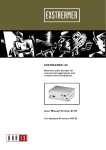
Front view
Rear view
5
1
1
2
3
Reset button
A brief press of the button will reset the device.
Holding the reset button pressed in for
approximately 10 seconds will reset the device
and restore the factory default settings when the
button is released.
2
EXT.
USB interface solely for flash memory sticks
(not supplied)
3
LCD
Screen for status display
4
Headphone out
Standard stereo mini jack (3.5 mm)
5
4
A
B
C
A
Line out
Stereo RCA line outputs
B
RS-232 serial port (DSub 9 pin male)
Pin Description
1 Relay common
2 Receive Data [RxD]
3 Transmit Data [TxD]
4 V+ 12V*, 100mA max
5 Ground [GND]
6 Not connected
7 Ready to Send [RTS]
8 Clear to Send [CTS]
9 Relay Normally Open
D
* Pin 4 will provide 2.6V less than the supplied
voltage on Vin+ (D) but not more than 12V.
C
LAN port 10/100 (RJ45)
Standard RJ45 Ethernet socket
D
Power
Pin Description
1 Vin - (ring)
2 Vin+ (center pin)
9..30 VDC
12..24 VAC
IR sensor
Sensor for the infared remote control