1
LAMONA Appliances
09 - How to operate the Timer
How to operate the oven timer
4.
5.
6.
7.
8.
e
f
g
h
i
j
The oven will switch on for the
length of
cooking time prior to
end time. During the
cooking process, the cooking symbol ( ) on the
display is lit.
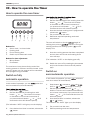
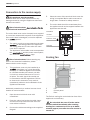
Buttons for:
e. Alarm clock / muinet minder
f.
Cooking time
g.
End of cooking time
h. Switch on/off automatic mode
9.
Buttons for time adjustment:
i.
Minus Button
j.
Plus Button
Switch on fully
automatic operation
1.
2.
Once the cooking process has been completed
and an alarm will sound and heating of the
oven will stop.
(The indication “AUTO” on the display goes off.)
The maximum time to be set for the end of the
cooking process is 23 hours and 59 minutes. In the
case of a power cut, the program will be cancelled
and reprogramming is needed.
In this mode of operation, you can
oven is to switch on/off automatically.
Keep button ‘ ’ pressed.
Set the desired length of the cooking time with
button ‘ ’ or ‘ ’. The clock will increase
or decrease in one minute increments. If
you press and hold button ‘ ’ or ‘ ’ for 3
seconds the time will advance quickly.
Once the desired cooking time is programmed
release the ‘ ’ button.
Put your dish into the oven.
Select the required operating mode and
temperature.
10. Switch the oven off by rotating the thermostat
and/or the function knob to the off position
(top).
Switch on
semi-automatic operation
In this mode of operation, you can
oven is to switch off automatically
when the
Keep button ‘ ’ pressed.
Set the desired end of cooking time with
button ‘ ’ or ‘ ’. The clock will increase
or decrease in one minute increments. If
you press and hold button ‘ ’ or ‘ ’ for 3
seconds the time will advance quickly.
when the
the
Keep button ‘ ’ pressed to
time or ‘ ’ to
the length of cooking.
2. Set the desired time with the ‘ ’ or ‘ ’
buttons. The time will increase or decrease in
one minute increments. If you press and hold
button ‘ ’ or ‘ ’ for 3 seconds the time will
advance quickly.
3. Once desired time is reached, release the
‘
’ or ‘ ’ button.
The indication will “AUTO” light up on the display.
1.
(The indication “AUTO” will light up on the display.)
3.
Once desired end time is reached, release the
‘ ’ button.
14_ How to operate the timer
4.
5.
Put your dish into the oven.
Select operating mode and temperature.