1
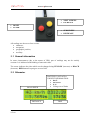
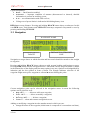
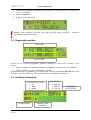
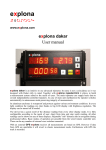
www.explona.com NEXT SCREEN INCREASE SUBSCREEN DECREASE RESET ENTER All readings are shown on four screens: odometer, navigation, geographic position, auxiliary. 3.1 General information In some circumstances (due to the nature of GPS) part of readings may not be entirely accurate. It is indicated with blinking of uncertain value. The cursor indicates the place which can be changed using YELLOW (increase) or BLACK (decrease). RED button accepts/goes to next field. 3.2 Odometer REAL SPEED DISTANCE explona v2.0 User manual version 1 BATTERY VOLTAGE or URGENT INFORMATION: Back Antenna H-W Voltage out of limits TIME