1
Stereo Programming (20MS233S only)
I
f your TV detects a stereo signal, it will set itself to
receive the stereo sound automatically. However,
there may be occasions when you want to set the TV
to mono (single-channel sound instead of stereo).
Follow these steps to change the STEREO control.
1
2
3
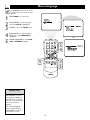
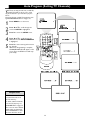
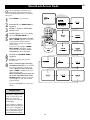
Press MENU to show the on-screen
menu.
Press 9 until STEREO is highlighted.
Press : or ; to choose YES or NO.
YES sets the TV to receive stereo sound
automatically when it is available in the
current TV broadcast.
NO sets the TV to receive all sound in
monaural (single-channel) format.
You can change a stereo signal to Mono,
but you cannot change a Mono signal to
stereo.
Helpful Hints
If Stereo sound is not available on the current TV program and STEREO is set to
YES, the TV will automatically
transmit monaural sound.
STEREO will appear in the
TV’s menu only if you have
the 20MS233S stereo model.
21