1
9.4.Variables range (allowed input values)
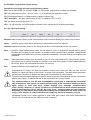
Periodical connectivity test can accept following values:
PTD: 0 to 99 days, PTH: 0 to 24 hours, PTM: 0 to 60 minutes, only positive numbers are accepted.
UST (limit temperature value): - 40.0 to +125.0 °C, as a decimal part separator is used
“.“
TS (Temperature Stabile): 0 to 999 seconds; positive numbers only
UST1 and UST2: the same values range as UST, in addition UST1 > UST2
TS1: the same values range as for TS
HTP: 1 to 120 minutes; only whole positive numbers; 999 = switch ON for unlimited period/time
9.5. Set values processing
Request: reads out the memory of the CommandCall control unit and displays the values on the screen
Apply:
writes PC setup screen actual values into CommandCall control unit memory
Initialize: loads factory default values to PC Setup screen and to CommandCall control unit memory
Save ... : writes PC Setup screen actual values into file stored in your PC (system will request user to specify
file name and location). By this means it is possible to have stored several „standard“ configurations
of parameters and SMS texts or archives of specific installations / customer settings stored during unit
installation.
Load ...: reads parameters setting from file stored in your PC onto CommandCall PC Setup screen (system
will request user to specify file name and location). Just after using „Apply“ function loaded data from
the file are written into CommandCall control unit memory.
Exit:
quits the session of CommandCall PC Setup
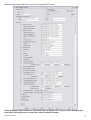
CommandCall PC Setup will read only firmware version from control unit after the start and will
display it in upper left corner of the screen, in section Unit information. To display actual parameter
values press „Request“ on bottom task bar of the CommandCall PC Setup screen.
To write actual parameters setting from the PC Setup screen into CommandCall control unit memory
please press „Apply“ on bottom task bar of the CommandCall PC Setup screen.
The communication of your PC with CommandCall control unit is automatically terminated
after 5 minutes of „idle“ period. To restore normal activity of the unit exit PC Setup and start it
again, please. In such case when system displays error message „Communication
failed“ (during „Request“ or „Apply“ function) it is recommended to store unsaved parameter
settings into temporary file on your PC by using „Save“ command, then you can restart PC
Setup and you can retrieve those parameters setting onto CommandCall PC Setup screen by
using „Load“ function to restore data from the temporary file and to continue your job.
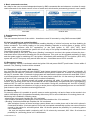
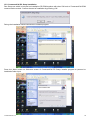
Initialisation screen of PC Setup requests to enter COM port number even when CommandCall
control unit is connected over the USB port of the computer !
CommandCall CC1
19