1
US 6,396,513 B1
6
5
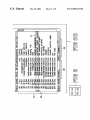
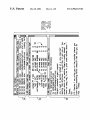
Window 33 contains the headers of the messages stored in
the remaining tWo WindoWs in response, by displaying, in
the mailbox currently selected. (A mailbox is selected in
WindoW 40, and the selection procedure is discussed beloW.)
WindoW 33, a list of messages contained in the selected
FIG. 2 illustrates an exemplary header 18. In WindoW 33, the
entries of column 39 correspond to the entries of ?eld 18D
in FIG. 2, the subject ?eld. If no subject ?eld exists, as When
the sender of the message did not create a subject ?eld, then
the ?rst line of the message is treated as the subject ?eld.
In WindoW 33, the entries of column 36 correspond either
to (a) the entries of ?eld 18A in FIG. 2, if the message Was
received from a remote location, or (b) to the entries of ?eld
18B, if the message Was sent by the user. The entries in
column 36 in FIG. 3 designated by the Word “to” indicate
mailbox, and, in WindoW 30, the full text of the ?rst unread
message on the list.
Additional Considerations
1. “Mailbox” de?nitions. The term “mailbox” refers to a
virtual entity. No physical “boxes” exist, nor does paper
“mail” exist. One de?nition of “electronic mailbox” is a
collection of messages, usually implemented as a ?le,
10
mailboxes containing outgoing messages. HoWever, outgo
ing and incoming mailboxes can both be sorted into the same
mailbox if desired.
The user can highlight a message header in WindoW 33 by
moving a cursor 39 to the desired message, causing the
message to be highlighted by bar 41. The user can then select
15
Another de?nition is a storage location, capable of receiv
ing and storing concatenations of messages, Which is
assigned to a speci?c individual, and Which is thus distin
guishable from other similar storage locations.
2. Checking for running of second program. As discussed
in Appendix B in greater detail, upon initiation of an Ishmail
running another Ishmail program. This checking is done
because it is considered undesirable to run tWo programs, or
processes, Which maintain access to common ?les.
the highlighted message, as by clicking the pointing device
For example, the user may have run the Ishmail program
at the user’s office, but have left the of?ce Without termi
nating the program. It is possible that the “of?ce” Ishmail
program holds an e-mail message Which has been modi?ed,
25 or has instructions to delete an e-mail message. If the user
generates, or modi?es, the same e-mail message using an
Ishmail program at the user’s home, it is possible that the
“office” Ishmail program may later unexpectedly impose its
modi?cations, or deletion, upon the e-mail message.
contained in the currently selected mailbox, together With
The invention prevents this problem by establishing a
selected data about the messages. WindoW 44 lists the
mailboxes contained Within the system, Which Were de?ned
by the user, and lists selected data about them.
WindoW 40 contains (1) a column 47 indicating the names
control ?le When Ishmail is initiated. The control ?le can be
vieWed as a ?ag Which is set, indicating that an Ishmail
program has been launched. Using a control ?le has the
advantage that it is detectable by the second Ishmail pro
of the mailboxes; (2) a column 49 indicating both the
number of unread messages, and the total number of
messages.
program, the invention checks Whether the initiating user is
used to move the cursor 39. Upon selection in WindoW 33,
the invention displays the selected message in WindoW 30.
Thus, header-WindoW 33 represents a table of contents of the
currently selected mailbox, and alloWs the user to select, and
display in WindoW 30, any message listed in the table.
WindoW 40 lists the existing mailboxes, and selected data
about them. This list is someWhat analogous to that of
header-WindoW 33. Header-Window 33 lists the messages
capable of containing a concatenation of one or more
35
gram.
The “home” Ishmail program notices control ?le, and
inquires Whether the user Wishes to take control. If not, then
messages, Within each mailbox; (3) a column 52 indicating
the time/date stamp of the oldest unread message; (4) tWo
columns labeled 55.
Within the latter, the left column refers to the maximum
the “home” Ismail program exits, leaving the messages
late in the mailbox, before an alarm is triggered. One Way to
undisturbed.
If the user does Wish to take control, the “of?ce” Ishmail
program is ordered to exit, and takes all actions as if
signal an alarm is to cause a speci?c icon to appear on the
manually terminated.
number of unread messages Which are alloWed to accumu
user’s computer display, such as one stating “The ‘Boss’
mailbox is noW full.” Of course, if the threshold is Zero, then
the alarm is triggered Whenever a neW message is received.
The user speci?es the threshold in the manner indicated in
APPENDIX A.
In a preferred embodiment, in FIG. 3, WindoW 40, a
textual character, such as an asterisk or “plus sign,” is placed
into the column labeled “Alarms,” adjacent the name of a
3. Sorting of current messages. During operation of
45
4. Sorting of outgoing mail. The Ishmail program offers
the option of alloWing the user to treat the user’s oWn
outgoing mail as incoming mail. That is, the outgoing mail
is sorted, using the pre-established ?lters, into the pre
mailbox, to signal an alarm’s having been triggered for that
mailbox.
de?ned mailboxes, Which are ranked and prioritiZed, as
described above.
The right column represents another type of threshold,
namely, the age in days of the oldest unread message. When
the oldest unread message reaches this age, another alarm is
Ishmail by a user, neW messages may arrive in the spool of
the e-mail program 3 in FIG. 1. The Ishmail program checks
for neW messages, doWnloads them, and then sorts them into
the proper mailboxes.
55
triggered.
5. Searching. The invention provides tWo types of
searching, upon tWo different types of entities. The ?rst type
of searching examines the ?elds of the messages, and sorts
WindoW 50 contains a chronological log of incoming
the messages into mailboxes, based on ?eld content, as
messages. The messages are listed in order of their arrival
described above. The second type searches the messages,
times. Each entry (or roW) contains the time/date stamp
once classi?ed in a mailbox, and can be used to trigger
time, the mailbox to Which the message has been assigned,
alarms.
The invention can search for any detectable characteristic
the origin of the message (or the destination, if sent by the
user), and the subject of the message (or the ?rst line of the
message, if there is no subject). The origin and the subject
of a character sequence. Some exemplary searches are the
folloWing:
correspond to the sub ?elds 18A and 18D in FIG. 2,
respectively.
A. A search for a particular name, such as “Wilson,” in a
The user can select any line corresponding to a mailbox
particular ?eld, or in all ?elds.
B. A search for a particular sequence of characters, such
in either of WindoWs 40 or 50, and the invention Will update
as “James A. Wilson,” in a particular ?eld, or in all ?elds.
65