1
Table of Contents
Copyright Information ....................................................................................... 3
Chapter 1 Safety Instructions .......................................................................... 4
Precautions .................................................................................................. 5
FCC Warning................................................................................................ 5
EN55022 (CE Radiation) Warning ............................................................... 5
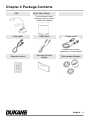
Chapter 2 Package Contents ............................................................................ 6
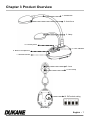
Chapter 3 Product Overview ............................................................................ 7
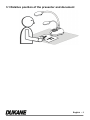
3.1 Relative position of the presenter and document ............................... 8
Chapter 4 Installation and Connections.......................................................... 9
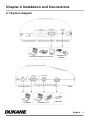
4.1 System diagram.................................................................................. 9
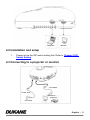
4.2 Installation and setup........................................................................ 10
4.3 Connecting to a projector or monitor ................................................ 10
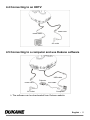
4.4 Connecting to an HDTV ................................................................... 11
4.5 Connecting to a computer and use Dukane AV software ................ 11
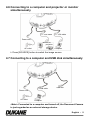
4.6 Connecting to a computer and projector or monitor simultaneously 12
4.7 Connecting to a computer and USB disk simultaneously .................... 12
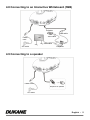
4.8 Connecting to an Interactive Whiteboard (IWB) ............................... 13
4.9 Connecting to a speaker .................................................................. 13
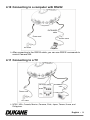
4.10 Connecting to a computer with RS232 ............................................. 14
4.11 Connecting to a TV ........................................................................... 14
4.12 Installing application software........................................................... 15
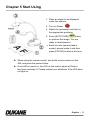
Chapter 5 Start Using ...................................................................................... 16
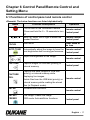
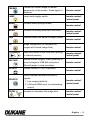
Chapter 6 Control Panel/Remote Control and Setting Menu ...................... 17
6.1 Functions of control panel and remote control ................................. 17
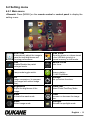
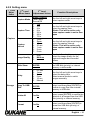
6.2 Setting menu .................................................................................... 19
Chapter 7 Descriptions of Major Functions .................................................. 25
7.1
7.2
7.3
7.4
7.5
I would like to automatically adjust the image to have the best
brightness and focusing performance .............................................. 25
I would like to switch image sources ................................................ 25
I would like to switch the image mode .............................................. 25
I would like to make text clearer and photos more colorful .............. 25
I would like to zoom in/out images ................................................... 26
English - 1