1
FAQ
FAQ
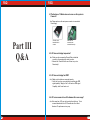
5.1:The Hardcano 13 Module does not come on after system is
Powered?
Ans: Please make sure the main power connector is connected to
Power Supply.
Part III
Q&A
Slide the cover
towards back to
remove.
Make sure all
connectors are
connected securely.
5.2: LCD does not display temperature?
Ans:1.Make sure its corresponding Thermal Probe is attached
correctly to the component you wish to monitor.
2.Examine the Thermal Probe to see if there is any cut or
Discontinuity!
5.3: LCD does not display fan RPM?
Ans:1.Make sure the cables are connected securely.
2.Verify the fan unit you are controlling & monitoring has RPM
signal capability. Majority of the 3 wire fan have RPM signal
Capability, while 2 wire fans do not.
5.4: LCD screen seems to be a little dimmer after some usage?
Ans: After some time, LCD may not be as bright as initial use. This is
a normal characteristic for all LCD screen and will not affect
Hardcano 13's performance in any way.
20
21
1