1
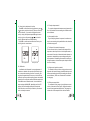
match the thickness by caliper/mirometer, then press VEL to
display the sound velocity and save in current soud velocity
memory unit.
Measuring
the thickness
Adjusting
actual thickness
3.6. Review the saved data
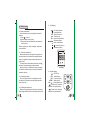
In normal status, press STORE for 2 seconds will enter
into review data mode, press
or
will display saved
data orderly.
Press STORE to exit the review mode and back to normal
status.
Velocity read out
Review saved data
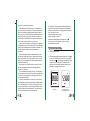
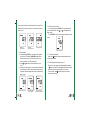
3.5.Data storage
1>. Keep pressing STORE for 2 second to enter the data
store mode ,LCD display THICKNESS, mm, M icon
with first memory unit. If the first memory unit is not
being registered, so LCD will display 0.0.
2>. Press
or
to select your desired memory unit
(1-10).
3>. After picked up the memory unit, the new measurement
will be renew the memory unit, when the measurement
completed the last reading will be stored in the selected
memory unit.
Select memory unit
-10-
Taking measurement
& saving data
3.7. Low battery indication
When icon
flashes, please replace the batteries for
further measurement.
3.8. LCD back light & Automatic power off
Before turn on the gauge, hold pressing CAL, and press
button to turn on, the back light will be activated every
operation will turn on the back light for 7 seconds .
This unit will be turned off automatically in 2 minutes
without any operation.
Measurement &
storage accomplished
-11-