1
SAVING A MEASUREMENT TO DISK
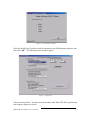
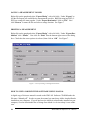
Right click on the graph and select “Export Dialog” with a left click. Under “Export” select the file format you would like the measurement saved in. BMP (bit map) and JPG (JPEG) are usually the most popular. Under “Export Destination” click on “File” Now
click “Browse” to name the file and select a storage location. See Figure 7.
PRINTING A MEASUREMENT
Right click on the graph and select “Export Dialog” with a left click. Under “Export Destination” click “Printer”. Now click on “Print” near the bottom right corner of the dialog
box. Check that the correct printer is selected, then click on “OK”. See Figure 7.
Figure 7 – Screen for Saving or Printing Measurements
HOW TO VIEW AND PRINT THE SOFTWARE USER’S MANUAL
A digital copy of this user manual is stored on the EMC-461 Software CD-ROM under the
file name “Manual.pdf”. In order to open the manual you must have Adobe Acrobat Reader
installed on your computer. If you do not have the Adobe Acrobat Reader installed on your
computer, it can be downloaded free of charge from Adobe’s web site at http://www.adobe.
com.
10
Model EMC-461 Software User’s Manual