1
PARAMETERS MANAGER 2.10 - USER MANUAL
Using Parameters Manager
5.3.1
Access to the program
Operate as indicated:
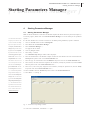
1. Select Setup > Log in.
The Password dialogue window will be displayed.
2. Select the type of user account from the drop-down menu (for example OEM) and enter the password of the
(12) make sure you do not use the
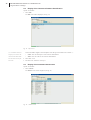
account into the text box (see Fig. 13)
letter "l" instead of number 1 and
The account passwords are stated on the Certificate of Authenticity.
(12)
.
the letter "o" instead of number 0
Fig. 13 - Password dialogue window.
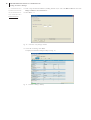
3. Select Ok.
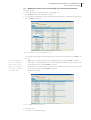
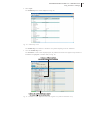
The Parameters screen will be displayed (see Fig. 14).
Fig. 14 - Parameters screen.
21