1
Introduction
DISPLAY
Custo m Payroll automatically ada pts to any IBM-compatible standard d isplay,
monochrome or color, with 80 columns and 24 lines capacity. The operator can
change P ayroll's default choice of display colo rs.
PRINTER
The system requires at least one, and supports up to four printers, each of which
may be any of the following types:
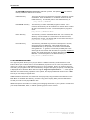
DOT MATRIX:
An "Epson compatible" printer with at least 80 column
capacity (at 10 Characters/inch) and a tractor feed
mechanism. Dot matrix printers intended for W-2 form
production sho uld be rated for at least four co pies. A
botto m feed or a "straight thro ugh" paper path is
recommended. T he tractors sho uld be adjustable to
accom mod ate 8.5"-9.5" wide forms.
LASER:
Hewlett-Packard Laserjet Series II, III, IV, V, VI, or later
100 % comp atibles suppo rting PCL 3 , PCL 4, or PC L 5.
DAT ASM ITH Payroll handles either local or network
printers, including PJL printers.
INK JET:
Hewlett-Pa ckard Deskjet or 100% com patible
supporting PCL 3 o r later, including network
configurations using PJL printers. The pap er positioning
mechanism on some inkjet mo dels m ay not b e accurate
enough for certain densely-printed standard forms, such
as 4-up W-2's and 1099's. “Windows only” printer
models will not print standard government forms
correctly.
Both Laser and dot matrix printers should be able to print at 10 characters per inch
pitch and six lines per inch vertical spacing. Custom Payroll supports compressed
printing of wide reports, and landscape orientation. When using standard 11" long
forms, these settings yield 66 lines per page on dot matrix printer, 60 lines per page
on a laser or ink jet printer using portrait orientation, or 45 lines per page on a laser
or ink jet printer using landscape orientation.
MOUSE
A Microsoft Mouse, "PC-Mouse," or a compatible mouse may be used, but is not
required, with Version 9.5+. All selections can be made using the keyboard.
INSTALLATION
The program CDROM or diskette set delivered with your system is your master and should never be
used for actual processing. Be sure to file the originals in a safe place. Unless otherwise noted in the
acco mpa nying paperwork, each new C DR OM or diskette set co ntains all the programs necessary to
update your existing installation or to create a new installation.
© 1990-2005 LPI Information Systems
Revised 11/2005
1-3