1
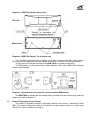
3. Install the GSM TSDA by removing the cover and the circuit board from the base. Attach the
base using two screws, then snap-in the circuit board and then replace the cover.
Double-sided tape can be used to mount the GSM TSDA on to a properly prepared surface.
4. Connect the Temperature Sensor to the GSM TSDA. Prior to making the connection, it is
necessary to break-out the plastic plugs from the connection opening.
5. Verify operation in accordance with item 2.5.
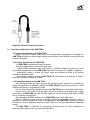
6. Install the external Temperature Sensor at a location where temperature needs to be monitored,
bearing in mind that the external Temperature Sensor is enclosed inside a metal casing (see diag.
10).
7. Run the Temperature sensor connection cable in a manner that does not interfere with moving
about the monitored location.
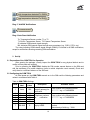
Diag. 10- Sensitive Operating Surface of the external Temperature Sensor
3
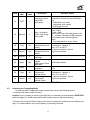
Troubleshooting the GSM TSDA
Table 5- Troubleshooting Guide
Description of Symptom
No Audio beeps or “GSM”
LED flashes in the GSM
TSDA after the Battery is
installed.
After powering up the GSM
TSDA detector (inserting the
battery) the “GSM” LED
flashes rapidly & does not
flash once (1) Every (4) four
seconds as Required (SIM
card is not Logging on to the
network)
Possible Cause
1. Battery improperly
installed;
2. Battery is discharged
Solution
1.Remove the battery & re-install
properly using proper polarity;
2.Install a new fresh Battery:
CR123A 3V
1.SIM card is not installed;
1.Verify the presence of a SIM card;
2.SIM card is incorrectly
2.Remove SIM card & reinstalled;
install as shown in diag.7;
3.SIM card is locked with
3. Disable the SIM card PIN code
a PIN code;
feature by using a GSM Telephone
(see tel. operating manual).
4.(a) Re-locate the GSM TSDA to a
4.”GSM” network is
inaccessible.
location with good access to a GSM
Network signal (in accordance with
item 2.7 in this user’s manual
(b)Change the mobile Network
provider.
When verifying operation with 1. Faulty contact between the 1.Verify connection.
the Ext. Temp. Sensor, the Temp. Sensor jack and the
GSM TSDA Does not enter GSM TSDA socket.
“ALARM” mode, LED does not 2. Insufficient temp. to
2. Create sufficient temp. or reduce
glow Red, no Notifications Trigger threshold.
temp. Threshold.
triggered.
15