NAS System
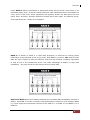
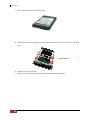
c. Place the hard drive in the disk tray.
d. Install the mounting screws on the bottom part to secure the drive in the disk
tray.
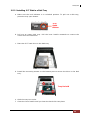
Tray Hole A
e. Slide the tray into a slot.
f.
18
Close the lever handle until you hear the latch click into place.
User’s Manual