1
5
6
7
8
9
lected, you must enter the
geographical
coordinates
of the antenna’s position.
All of this is fairly logical.
Once the antenna setup
is completed, you can move
on to channel searching. We
can search either one satellite or a number of satellites
in a single pass. Of course,
the latter is possible if motorized or multi feed antenna systems are in use. The
factory
preprogrammed
satellite list is not very long
and has only 41 positions.
Some important satellites
for the European market
are missing – for example,
HELLAS SAT at 39° east is
not in the list. However, as
you will see, this is not a big
problem at all.
We started with an automatic scan of the HOTBIRD satellite at 13° east.
The S3000HDCCI required
almost 7 minutes to scan
92 factory preprogrammed
transponders; this is fairly
good. 1239 TV channels
and 357 radio channels
were found. After resetting
the box and turning on the
Network Search option, the
scan was repeated. This
time it took 8 minutes and
45 seconds but the number
of channels grew significantly: 1510 TV channels
and 418 radio channels.
But here’s the best part:
as the proud owner of an
S3000HDCCI, you can opt
for yet another option – a
blind scan. We couldn’t wait
to test it. There are no options to be set for this kind
of a scan (like frequency
range or polarization) so
you just select blind scan
and let the box take care
of the rest. We expected
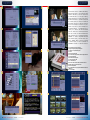
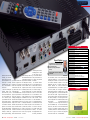
5. Three video games are
available
6. REC submenu to configure a
USB memory device
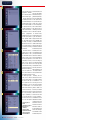
7. Satellite List
8. Setting up a USALS
compatible motorized antenna
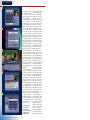
9. Ready for scanning one
satellite - HOTBIRD 13 E
20 TELE-satellite — Global Digital TV Magazine — 08-09/2011 — www.TELE-satellite.com
the blind scan to take much
longer then the automatic
scans based on the preprogrammed transponder lists.
But we were shocked when
the box reported the end
of the process after only 5
minutes and 15 seconds.
It found 98 transponders,
1485 TV channels and 417
radio channels. That’s an
outstanding result and far
better than we expected!
As mentioned before,
the HELLAS SAT was missing from the satellite list.
Keeping in mind the results
from the HOTBIRD scans,
we decided to add the HELLAS SAT channels using the
blind scan feature and not
the automatic scan because
this would have required us
to manually enter in a number of transponders. Within
just a couple of minutes the
blind scan was finished; it
found 27 transponders and
231 TV channels. For this
test we were looking only
for TV channels and noticed
that not only high symbol
rate transponders were detected and processed but
SCPC transponders as well
– for example 11139 MHz V
with a symbolrate of 2.891
Ms/sec.
Considering
that
the
blind scan was so successful, we decided to perform
the installation as if we
were doing it for our own
home receiver. We deleted
all of the factory preprogrammed satellites and
entered only the satellites
that can be received at our
location with a 90 cm motorized dish. That turned
out to be 25 satellites –
from HISPASAT at 30° west
to INTELSAT 12 at 45° east.
The blind scan’s job was to
find all the FTA TV and radio channels on these satellites and we started it in
the Multi Satellite Search
submenu. After leaving the
box unattended for about
two and half hours, we dis-