1
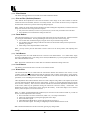
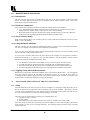
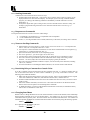
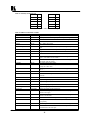
Table Of Contents
Section
1
1.1
1.2
2
3
4
4.1
5
5.1
5.2
5.3
5.4
5.5
5.6
5.7
6
6.1
6.2
6.3
7
7.1
7.2
7.3
7.4
7.5
7.6
8
8.1
8.2
9
9.1
9.2
10
10.1
10.2
10.3
10.4
10.5
11
11.1
11.2
11.3
11.4
11.5
11.6
12
13
13.1
13.2
14
15
16
Page
INTRODUCTION
A Word about Scan Converters
Factors Affecting Quality of Results
SPECIFICATIONS
HOW DO I GET STARTED?
UNPACKING AND CONTENTS
Optional Accessories
CONNECTING THE HARDWARE
Rack Mounting
Connecting the Scan Converter to a Computer and Monitor
Connecting the Video Outputs
Optional Connection of an External Reference Signal
Connecting the Serial Cable
Connecting the AC Power
Turning the Scan Converter On
ABOUT THE SCAN CONVERTER
Quick-Set Buttons
Special Button Usage on Power-up
Special Multi-Hold Buttons
MENU STRUCTURE AND FEATURE CONTROL
Status Mode
Adjust Menu
Studio Genlock Mode
Screen Size Mode
Zoom Mode
Manual Set Mode
ADVANCED MENUS & FEATURES
Advanced Menu
Engineering Menu
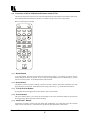
CONTROL AND SETUP USING THE INFRARED REMOTE CONTROL
Introduction
Functions of the RM-SC Infrared Remote Control Unit
REMOTE MOUSE EMULATOR
Introduction
Hardware Connection
Scan Converter Setup
Using the Mouse Emulator
Toggling Zoom/Pan and Mouse Modes
RS-232 COMPUTER CONTROL OF THE SCAN CONVERTER
Setup
Sending Commands
Responses to Commands
Notes on Sending Commands
Restricting RS-232 Commands to Certain Units
Changing Baud Rates
GETTING THE MOST FROM YOUR SCAN CONVERTER
TECHNICAL DATA
Computer Input
Fuse Replacement
TROUBLESHOOTING
LIMITED WARRANTY
COMPLIANCE NOTICE
KRAMER ELECTRONICS, LTD.
2
3
3
3
4
5
5
5
5
5
5
5
6
6
6
6
7
7
7
8
8
8
9
10
10
11
11
12
13
15
16
16
17
19
19
19
19
19
19
19
19
20
20
20
20
20
22
23
23
23
24
26
27