1
20
10.
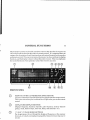
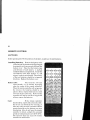
"PRI"BUTTON
For settingor cancellingthe priority function.
11.
"ALM'BUTTON
For setting or cancellingthe alarm function.
12.
"SKIP" BUTTON
For selecting a memory channel(s) that you want to be skipped while
scanning,or cancellingthe skip function.
13.
"DEI"AY'BUT"TON
For setting the amount delay time that a channel is monitored beforethe
resumescanfunction starts scanningchannelsagain.
14.
"BAND LIMIT"'BUTTON
For setting the lower band limit and the upper band limit for the band
scanningfunction.
15.
..ANT'BUT"TON
For selectioneither "ANT 1" or "ANT 2" to receiveon.
16.
t;
i 1,
"ATf'BUTTON
For turning on or offthe receiverattenuator(-10db)circuit.
'1 4
r t.
"AUTO" BUTTON
For recalling the factory programmedmodethat has the frequency range,
mode (AM, FMN, or FMW), and channel step already programmed into
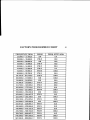
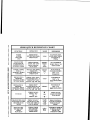
memory. Refer to the "AUTO PROGRAMMED" Iist in this manual.
18.
"TIMER ON / OFF" BUTTONS
The ON lights up when you press the "ON" timer button on the remote
control, and the "ON" goesout when you pressthe "ON" button again. The
OFF lights up when you pressthe "OFF' timer button on the remote control,
and the "OFF" goesout when you press the "OFF" button again.