1
Using the Reverb Programs
960L
Parameters Used in the 960L Algorithms (cont.)
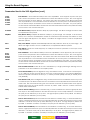
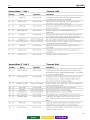
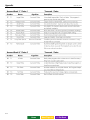
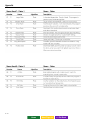
InLvl
LvL>L,
LvR>R,
LvL>R,
LvR>L,
LvLF>LF,
LvLF>LS,
LvLF>RF,
LvLF>RS,
L v L S > L F,
LvLS>LS,
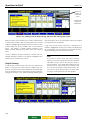
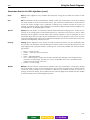
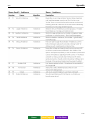
Input Level sets level for all input channels simultaneously. Used to prevent processor overload by
counteracting gain increases caused by high RTMid, BassMult, and Delay feedback levels. Unless
extreme values of these controls are used, we recommend that you leave InLvl set at the factory
preset position.
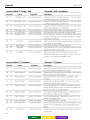
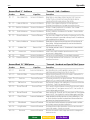
LVLS>RF,
LvLS>RS,
LvRF>LF,
LvRF>LS,
LvRF>RF,
LvRF>RS,
LvRS>LF,
LvRS>LS,
LvRS>RF,
LvRS>RS
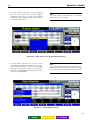
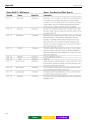
Reflection Levels. In many real spaces, distinct reflections and echoes are an important part of the
sound, so many of the 960L's reverbs have reflection delay and echo paths with appropriate controls.
The Reflection Delays set the delay time. For example, dLF>RS is the delay time in a path from the
Left Front Input, through the diffusor, through a delay of dLF>RS duration, and finally to the Right
Surround Output.
Each of these delay paths has its own level control as well as a master control for all of the (ErlLvl).
The level of the example delay path is set by the related control LvLF>RS.
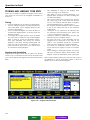
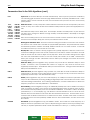
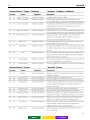
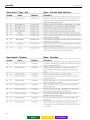
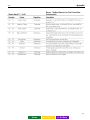
MidRT
Midrange Reverberation Time. The basic control for setting the duration in seconds of the reverberant tail. This is the control that is most like the physical RT60 parameter. The perceived time will also
be affected by RtHicut and Bass. Generally, MidRT should be set to a value of about 1.2 seconds
for small rooms and up to 2.4 seconds or so for halls.
Mix
Wet/Dry Mix . Each of Lexicon's factory programs are typically shipped at 100% wet, and we recommend controlling the mix at the console, rather than on the LARC2. Where a console is not available this control can be used to adjust the wet/dry ratio. When a console is being used to adjust
the mix of the reverberation returns, be sure the wet/dry mix control is set at 100%. Otherwise the
direct path through the 960L will interfere with the direct path through the console and severe
combing will occur.
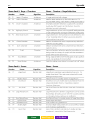
RefDly
Reflection Delay (Reverse algorithm only) operates very much like the reflection delays in other
reverbs. In Reverse, it has a particular role, which is to supply the "dry" sound at the end of the
apparently reversed tape. The Reflection Delay is connected to Size. Changes in Size will scale this
delay. See also Reflection Level.
RefLvl
Reflection Level (Reverse algorithm only) operates very much like the levels for reflection delays in
other reverbs. In Reverse, it has a particular role, which is to supply the "dry" sound at the end of the
apparently reversed tape. See also Reflection Delay.
Rolloff
Rolloff (Stereo algorithms only) sets the cutoff frequency of a 6dB per octave low-pass filter at the
output of all reverberation processing. Rolling off high frequencies with this filter can result in more
natural-sounding characteristic. For a shelving characteristic, use Shelf. Rolloff does not affect the
frequency response of the early reflections. See RefHicut.
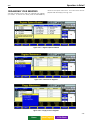
RPreD
Rear PreDelay (Surround algorithms only) is an additional predelay that can be added to rear input
path to recreate the effect of the space’s rear wall being farther from the listener than the front.
The total rear-channel predelay is the sum of RvbPreD and RPreD, so the latter’s values are always
preceded by a "+" on the display. E.g., with RPred of +20 and RvbPreD of 100, the onset of reverberation from the rear will occur 120 msec after the initial acoustical event. For best results we recommend that the RPreD control be set to values less than 20ms. Greater values tend to make the
reverberation from the rear separately audible from the front reverberation, and the room seems
less natural.
RearRoll
Rear Rolloff (Surround algorithms only). Like Rolloff in Stereo, this controls the cutoff frequency of a
6dB per octave low-pass filter at the output of all processing, but affects the rear (LS and RS) channels only. A separate parameter, FrRoll, controls the rolloff for the front (LF, C, and RF) channels.
5-13
Home
Next Page >>
<< Go Back