1
l,Desk:
Th心 handb。 °k oontains impodant seou"ty measures and the correc1use ofthe
ρroductinforma“ on,n orderlo aˇ o d accldents P s make sure to reading the
manual oarefu"y before use lhe deˇ ice
● P ease don’ t be in h gh temρ erature,mo sture。 r very dusl p|ace
● P ease don’ t be in high temperat凵 re,Especialyin summer don`putthe device
n the car when Wind° ws closed
● AVo洄 fa"or Vio|en1ooI"sion ofthe device,don’ t make the TFT dis口 ay screen
wereˇio|enttremo1This oouId cause iFT disp ay scr9en abnormal or damoge
● Please choose the appropoate vo ume,Vse headphones shou ds no1be1oo big
ˇoume,亻 fee unn"us,L。 wer theˇ olume or stop using"
● 创ease charge ln the fo"owhg c°
A、
B、
C、
D、
ndⅢ °n,
The baueγ powerlC0Ns shoWs haˇ eno p° wer
The system aulomaucally shut off,sladup ater power o矸
0peraton buktons no response
The maoh ne thalthe lop"gh1。 。
mershow red oons
soon
●When lhe device in the format or ongoing upload and download臼
dont s凵 ddenly disconnect,This Could cause apρ
Ⅱ
oauon e"° 「
●Forlhose who because of damage lo lhe product,repa“ ‘
or other
le,创 ease
oaVses of
erased the memory,The company sha"nol be"able for any respons bⅡ
p丨
ease fo"ow lhe user manualfor lhe standardized opera刂
on lo use the "y,
device
●Don1dsassemb|e the product,don`use aIoohd、 T"nner or benzene to
scrubbing products
use the device one ofthe place of prohib"to use electronic eq凵
reg ona|(such as the创 ane)
●D。 n.t
11Touch paneI
Capad臼 ve touch pane⒈ h The operauon,lo d⒗ k,dragung on
lhe louch panel
ipmentin
●P|ease don.1using the Tablet PC when you n d"ving or waIking down the
1,2POWER
stree1
●VsB jusl only be used for dah1ransmis⒍ on
stadup∶
inte亻
The company reserves the"ght to improve producl,produds speoncauon and
deζ gn have any change,the nformauon is subleCl to changes w"hout p"or
notice
(Th。 lable1is no waterproof function)
【Remark】 A"pictures n this manua|is jus1for your reference products
spe。 ncaⅡ °
n and de引 gn have any change,The informauon|s sublectto ohanges
Without p"or nouce
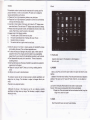
Long Press and hoId the power buton,the system wⅢ
enterlhe main
aoe
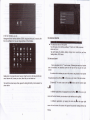
shuldown∶ h the main menu interface,Press the power butlon about5seoond lo
pu° n,c"ke"ok"you Can safe|y shut
shuldown,The system oan hint"power ofr・ °
doWn
LoCk sCreen∶ short press Powe`buuon t°
l°
ck screen or unIook screen
Remark1When poweris emplysyslem wⅢ shutdoWn automau∞
2Ⅲ egaltum o仟 the devloe,restad w"scan and restore the d"ysk,"may lake
longer ume to enterinlo system
13BACκ
short Press BACK bu仗 on WⅢ relum the asl nlerfaoe,