1
Table of Contents
Introduction ...................................................... 3
Setting the Combination................................... 4
Securing the DEFCON CL ............................... 5
Locking the DEFCON CL to your Notebook Computer................................................................. 6
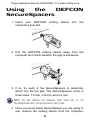
Using the DEFCON SecureSpacers ................ 8
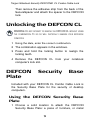
Unlocking the DEFCON CL ............................. 9
DEFCON Security Base Plate ......................... 9
Specifications.................................................. 11
Technical Support ........................................... 12
Recording Your Combination.......................... 13
2