1
Contents
Contents
1
2
2.1
3
4
5
6
6.1
7
7.1
7.2
8
8.1
8.2
8.3
9
10
10.1
11
Introduction
Getting Started
Quick Start
Overview
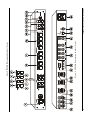
Your VP-23DS Presentation Switcher / Scaler
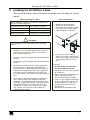
Installing the VP-23DS on a Rack
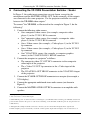
Connecting the VP-23DS Presentation Switcher / Scaler
Connecting a PC
Operating the VP-23DS Presentation Switcher / Scaler
Operating your Switcher
Operating the Scaler Section
Flash Memory Upgrade
Downloading from the Internet
Connecting the PC to the RS-232 Port
Upgrading Firmware
Technical Specifications
Hex Tables
Audio Gain Control Hex Tables
VP-23DS Communication Protocol
1
1
1
3
3
7
8
10
11
11
12
13
13
13
13
19
20
20
21
Figures
Figure 1: VP-23DS Presentation Switcher / Scaler
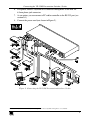
Figure 2: Connecting the VP-23DS Presentation Switcher / Scaler
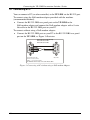
Figure 3: Connecting a PC without using a Null-modem Adapter
Figure 4: Setting the DIP to Flash Program
Figure 5: Splash Screen
Figure 6: Atmel – Flip Window
Figure 7: Device Selection Window
Figure 8: Selecting the Device from the Selection Window
Figure 9: Loading the Hex
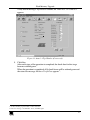
Figure 10: RS-232 Window
Figure 11: Atmel – Flip Window (Connected)
Figure 12: Atmel – Flip Window (Operation Completed)
Figure 13: Setting the DIP to Normal
4
9
10
13
14
14
15
15
16
16
17
18
18
i