1
RESILIENT MODULUS TESTING
© 2013 Geocomp Corp.
A: The default values may change either after an electrical power problem or due to
inadvertent actions by the end user.
You will need to revert back to the internal default values of your system by following
these steps:
1. Turn off the units in the system.
2. Wait about 10 sec.
3. Turn each unit back on (one at a time) and immediately press the ESC key on the
keypad to reset everything back to the imbedded controller default values.
4. If you had been running several test systems with one PC, you will need to reenter
Node ID numbers (on the hardware units) so that they correspond to the values you
were using in the control programs. (The default values for the hardware units are: 65
for LoadTrac-II and 64 for Cyclic-RM.)
Software
I. CALIBRATION /ZEROING
I-1. Q: In many of our different test files, the calibration values in the Summary Table and
the values in each sensor's individual calibration table are not in sync. Could you please
explain which values the program uses, and how to make sure they are correct?
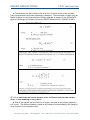
A: When running a test, the RM5 software uses only the parameters that are shown in the
Calibration Summary. A mismatch between these values and those on the Calibrate window
for a particular sensor can occur if the Calibrate window values have not been saved by
clicking the Save button on that window.
To determine whether or not the Summary values are correct, you need to know how the
test was set up. The two possibilities are described below.
The parameters are correct
You have two LoadTrac-II/Cyclic-RM systems, A and B. You plan to run a test on unit A. A
file for a test run on unit B is a good template for the test, but the calibration parameters in
it are those for the sensors on unit B. You open an RM5 control window and load that file into
the window. We will call that file Test-B.
Next, you open a second RM5 control window and load into it a file for a test that was run
on unit A. We will call that file Test-A.
Finally, you copy the calibration parameters from the Calibration Summary in Test-A and
paste them into the Calibration Summary in Test-A.
Geocomp Corporation · 125 Nagog Park · Acton, MA 01720 · Tel 978-635-0012 · Fax 978-635-0266