1
CHAPTER 7: Troubleshooting.
7. Troubleshooting
In most cases, nearly every issue with the Mondo III Matrix can be resolved by checking the Cat5 cable
terminations and making sure it is pinned to the TIA/EIA 568B specification. However there may be other
problems that cause the system to not perform as designed. Below are solutions to the most common
installation errors:
Cannot send switch commands or Mondo III does not respond.
Most serial connectivity issues can be solved by ensuring the transmit and receive pins are connected correctly
and serial settings are correctly configured.
It is recommended to use a simple serial terminal program such as Hyperterminal (a Windows program) to send
single commands to ensure the Mondo III Matrix is functioning (ensure “local echo” mode is enabled to see
commands sent).
In the case where a third party control application is used to control the Mondo III Matrix, please ensure serial
connectivity using a simple terminal program such as Hyperterminal first, then check that the correct signal pins
are connected to the Mondo III from the third party application. Lastly, ensure serial port settings have been set
correctly.
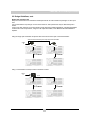
In the case where there are multiple frames, disconnecting slaves from the master first, then adding slaves back
in can isolate inter frame connectivity problems.
Remember to power cycle the master when slave frames are added. Or use the #I command to re-initialize the
system.
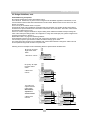
When the master is powered on, it outputs information from the serial port on the number of frames it has found.
This can be useful in determining serial connectivity issues.
The $GEO command may also be used to query the system and determine the reported matrix size to see if all
slaves have been recognized.
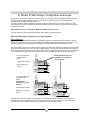
Each slave frame will have a blinking asterisk in the LCD until it has communicated with the master frame.
Slave frames with blinking asterisks have not been recognized by the master and will not function until master
communication has occurred.
Not all inputs and/or outputs switch correctly
Ensure all slave frames are connected via the RS232 serial bus and have been recognized by the master. An
asterisk in the LCD will blink until the frame communicates with the master frame. It may be necessary to power
cycle slave frames and lastly the master to establish communication.
The $GEO command may also be used to query the system and determine the reported matrix size to see if all
slaves have been recognized.
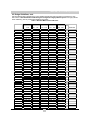
Check frame addresses (see table 1 in section 2) and ensure they are correct. Inputs and Outputs are
determined by frame address. An incorrectly addressed frame can produce unpredictable results.
If one or two inputs/outputs do not display the intended signal, check the cabling between the transmitter and
Mondo III Matrix or Mondo III Matrix and receiver unit. See the transmitter/receiver user manuals for additional
information on troubleshooting.
No video is output to display on Mondo III Output
Ensure transmitter and receiver are correctly configured and functioning (see respective user manuals for each
unit). Ensure Cat5 cables are correctly terminated and connected.
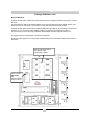
Check source input (connect a transmitter unit to a cascade output of the suspect input card to ensure signal is
being transmitted into the Mondo III Matrix).
37 35