1
Project Risk Analysis by Katmar Software
Version 2.1
Part 1 User Manual
1
Introduction to the Project Risk Analysis Program
The purpose of this program is to enable capital risks on projects to be evaluated, and for the financial
contingencies required to cover those risks to be calculated in a rational and defendable manner. Too
often the project contingency is calculated as a "gut feel" amount, without much consideration for the real
risks involved. The procedure followed in PRA encourages disciplined estimating, and will calculate the
required contingency according to the proven statistical method known as Monte Carlo Simulation.
Although PRA uses sophisticated statistical techniques, it has been written for project professionals who
are more at home with estimating and costing than with statistics. All the statistical models and
distributions required have been specifically set up for contingency analysis and no knowledge of statistics
is required. A tutorial on using statistical distributions in capital cost estimating is included in Part 2 of this
manual. For those who are interested in the underlying methods used to calculate the risks and required
contingencies, they are described in Appendix A.
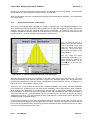
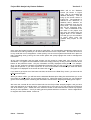
The results calculated by PRA can be displayed in easy-to-read graphical formats that quickly and
effectively give the estimator an overall appreciation of the risks. These graphs are also ideal as support
documentation for presentations to senior management in the justification of requests for contingency
funds. The results are also available in detailed tabular format.
In the process of calculating the required contingency, PRA will also pick out and highlight the areas that
are sensitive to risk. By applying the Pareto 80/20 Principle you can then concentrate on the areas where
the potential impacts are greatest.
Those who have used other risk analysis programs based on range estimating will be able to get going
quickly by reading through the "Quick Start for Experienced Users" section in the manual. Newcomers to
risk analysis, and to Monte Carlo Simulation in particular, are recommended to work through the Tutorials
in Section 2. This will introduce the risk analysis techniques in general, as well as their application to
contingency analysis. Working through the tutorials will also take you step by step through the details of
how to use this program.
This program is distributed as shareware. It is not free software. The evaluation version is designed for
you to be able to thoroughly test the program and to determine its suitability to your needs. The
evaluation copy will operate for 30 runs. The program will be fully functional during this evaluation period,
except that it will not be able to produce printed reports.
At the end of the evaluation period (or preferably during it!) you can purchase the registered version which
eliminates the shareware reminders and the run limit. Thanks to the power of the Internet you can receive
the registered version within hours of deciding to purchase it. Full details on the license conditions and
ordering procedures are included in Appendices C and D.
2
Hardware and Software Requirements
The hardware and software requirements for PRA are simple. If your computer is running Windows
95/98/NT4.0 then it will run PRA. You will need less than 1 Mb of hard disk space for a full installation.
3
Installation and Start-up
An automatic installation program is included with PRA. The PRA package is usually distributed as a
single zipped file called ProjRisk.zip. Unzip the file to a temporary directory on your hard disk, or to a 1.4
Mb floppy disk. In Windows Explorer open the directory where you have the unzipped PRA package.
Part 1 - User Manual
Page 1