1
2 PREPARING FOR USE
2.4
Setting Laser Line
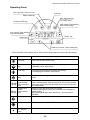
Use the line control key on the instrument display panel or the RC-200 remote control to
move the horizontal laser position to the left or right required.
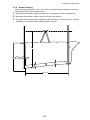
The maximum adjusting range is 9 m (29.5 ft.) at a distance of 30 m (100ft.)
The speed of the line travel is variable. When the key is first pressed, the speed will be
slow. By pressing the key continuously, the speed of line travel will increase.
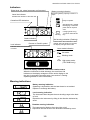
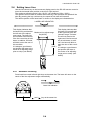
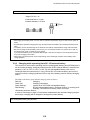
The relative position of the laser beam is shown on the display as indicated below.
LASER LINE INDICATOR
This display indicates that
the laser line is positioned at
the left end of the adjustment range. The laser line
will not travel to the left even
if the line control key is held
down. In addition, the laser
will blink to alert the user of
this condition.
It is always a good idea to
pre-position the laser to the
center of its adjusting range
prior to setup. (see below)
Maximum line adjust range
9m(29.5ft.)
30m
(100ft.)
This display indicates that
the laser line is positioned
at the right end of the adjustment range. The laser
line will not travel to the
right even if the line control
key is held down. In addition, the laser will blink to
alert the user of this condition.
It is always a good idea to
pre-position the laser to
the center of its adjusting
range prior to setup. (see
below)
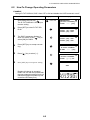
2.4.1 Automatic Centering
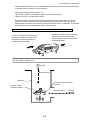
Press both line control left and right keys at the same time. The laser will return to the
center of the line adjustment range automatically.
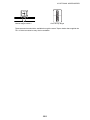
Laser line indication
Press the [
] and [
] key at the same time.
2-4