1
Troubleshooting
Hardware
Installation
Inspection
Once the mechanical contractor starts receiving delivery of the UNTs with
factory mounted controls, we recommend that arrangements be made to
pull a sample of the shipment for bench testing. This can be done by
loading a job configuration before all the controllers are mounted in the
unit cabinets.
Tools Needed
for
Troubleshooting
Tools needed for typical troubleshooting include:
•
ASC and N2 Bus Networking and Troubleshooting Guide Technical
Bulletin (LIT-6363003)
•
Digital Multimeter (DMM)
•
100k ohm resistor
•
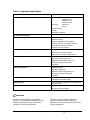
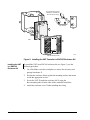
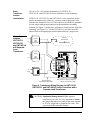
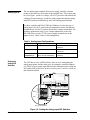
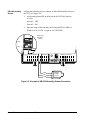
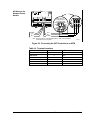
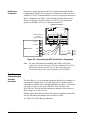
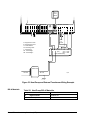
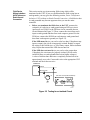
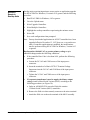
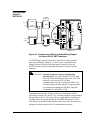
(optional) Double banana plug (see Figure 34; available from a local
electronics store or ITT Pomona Stock No. 34F856 or 34F845),
100k ohm 1/4-watt resistor for earth ground voltage tests
100k ohm, 1/4-watt
Use double banana plug for all tests that require
a 100k ohm resistor placed in parallel with DMM.
Steps:
1. Connect 100k ohm resistor under plug's prongs.
2. Insert banana plug into DMM.
3. Connect leads of DMM into banana plug.
banana
Figure 34: Double Banana Plug Used with 100k ohm Resistor
Installation
Checkout
Review the mounted UNT and compare it with the appropriate
illustrations in the Installation Procedures section of this technical bulletin
to ensure proper installation. Also refer to the engineering drawings
supplied for the individual site.
1.
Ensure that the mounting screws holding the subassembly onto the
base frame are secure.
2.
Ensure that accessory equipment is connected and labeled correctly.
3.
Ensure that the controller terminal connections are secure.
4.
Ensure that the N2 connections are secure and labeled correctly.
5. Ensure that the UNT switches are appropriately positioned. (Refer to
the Wiring Details and Networking the Controller sections of this
technical document.)
6. Ensure that there are no unwanted earth ground connections to the
controller.
UNT Controller—Unitary Controller (UNT)
61