1
number of bundles has been reached, the printer (e.g. Zebra label printer) prints the shipping carton label.
The label is attached manually to the shipping carton and scanned with the scanner for carton labels. The
shipping carton is thereby aggregated.
6.5 Case to Pallet Aggregation
All correctly labelled shipping cartons are scanned with the handheld scanner and packed on a pallet. Once
the pallet has reached the pre-defined number of shipping cartons, the label printer prints the label for the
pallet. Said label is attached to the pallet.
6.6 PLM User Interface
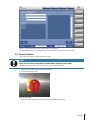
1 Press the main switch. The PLM or the remote desktop starts automatically.
2 Log in as a user.
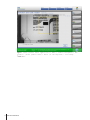
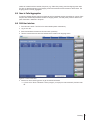
3 Select the handheld scanner from the main menu (overview).
4 Take the hand scanner and scan the barcode for the bundle or the shipping carton.
Figure 4: Home>Hand Scanner
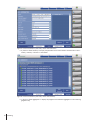
5 Perform one of the folowing options to get the wished Information
ð a) Click on the "Show information" button (Image 2) to display the code scanned by the hand scanner.
Handling
15