1
Configuring DataCheck
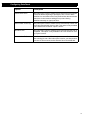
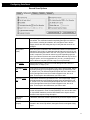
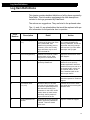
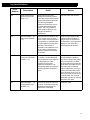
Record Scan Options
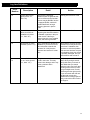
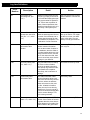
Scan Records
When this option is selected, each record is completely loaded from disk
and verified. The verification entails completely parsing the record from
top to bottom, including all subtables, text, and picture data. Various
integrity checks are done along the way to verify that the record is not
damaged.
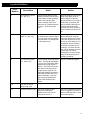
Verify Index
(slow)
When this option is selected, each field that is indexed in each record is
searched for in the index. It guarantees that all data can be found in your
indices and stresses the index to the max. If any piece of data cannot be
found it is reported. This test can take a long time depending upon the
size of your indices. But there are some situations that can only be found
using this option, and it is suggested that if you can, you always use it,
and if it takes too long that you find a way to use it periodically.
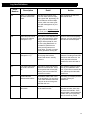
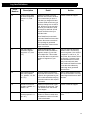
Find “NANs”
NAN (Not-A-Number). This occurs in real data types and is due to a
divide by zero, or sqrt(-1), etc.
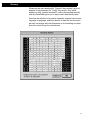
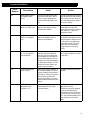
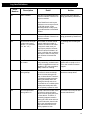
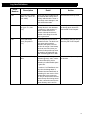
Find Alpha “Gemlins”
Finds Gremlin characters (as definied in the “Alpha Gremlin Map” dialog).
The default settings are for English language users of DataCheck, and
for “normal” use. The difference between Alpha and Text is that it is normal for Carriage Return and Line Feeds to appear in text, but not in
Alpha. There may be other differences you’d like to add.
Find Text “Gemlins”
Finds Gremlin characters (as definied in the “Text Gremlin Map” dialog).
The default settings are for English language users of DataCheck, and
for “normal” use. The difference between Alpha and Text is that it is normal for Carriage Return and Line Feeds to appear in text, but not in
Alpha. There may be other differences you’d like to add.
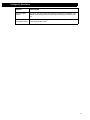
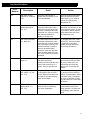
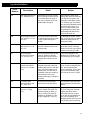
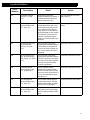
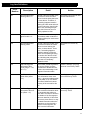
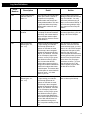
Export
If selected, then all scanned records are also exported to disk. The
records are exported in “Raw” format (PACKED). You can use the example “ImportRaw” database provided with DataCheck to import records
that have been exported using this option.
Interactive
(Export)
If interactive, then each record is presented to you before export occurs.
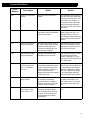
Allow Errors
(Export)
If Allow Errors is selected, then the record is exported even if errors were
detected in the record. By default, damaged records are skipped during
export.
21