1
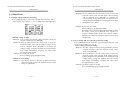
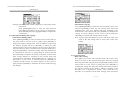
IPS-3201/3202 PROGRAMMABLE POWER SUPPLY USER MANUAL --OVP status clear: When the output voltage exceeds the set 33.00V OVP value, the output will turn off. The instrument will enter OVP mode and the display will show “Over voltage protection”. Press [SHIFT][OVP RESET] to clear the OVP state and return to normal operation. --Over current protection setting: The OCP of each channel may be set individually by pressing [OCP]. If OCP is on, when the output current for the channel equals or exceeds the set current value, the output of the instrument will turn off. The instrument will enter OCP mode and the display will show “Over current protection”. Press [OCP] to clear the OCP state and return to normal operation. 5-3. Voltage and current step setting: Press [SHIFT][STEP] to enter into the item selection menu. Use the rotary knob to set the cursor to the item which is to be modified. Use the keypad to enter the required value and press [ENTER]. Store the setting by using the knob to move the cursor to [SAVE], then press [ENTER] again to complete the setting and storing. To cancel the setting, move the cursor to [EXIT] and press [ENTER] to terminate the setting without storing. 14 IPS-3201/3202 PROGRAMMABLE POWER SUPPLY USER MANUAL Example:Set the step voltage of Channel 1 at 1.00V and the step current at 0.10A. Press [SHIFT][STEP], select CH1 voltage and enter [1][.][0][0][ENTER]. Select CH1 Current and enter [0][.][1][0][0][ENTER]. Finally, use the knob to move the cursor to [SAVE] and press [ENTER] to complete the setting and storing. Note: The setting of the step voltage and step current of CH1 CH2 CH3 can be set using the same display window. 5-4. Information storing and recalling: --Information storing: Press [SHIFT][STORE] to enter item selection menu. Use the rotary knob to set the cursor to [STORE] and press [ENTER]. The memory store menu will appear. Use the numeric keypad to enter the store address and press [ENTER] to complete the store. Example:The current setting store address of the instrument is “00”. Press [SHIFT][STORE] to enter the item selection menu. Use the rotary knob to set the cursor to [STORE], then press [ENTER] and input [0][0][ENTER] to complete the store. --Information recall: Press [SHIFT][RECALL] to enter the item selection menu. Use the rotary knob to set the cursor to [Recall Memory] and press [ENTER] to display the memory recall menu. Enter the recall address by using the numeric keypad and press [ENTER] to complete the recall. 15