1
Introduction
1.
Identify all products that will run on the PC, as well as the Site Code (to be generated during
the registration process) for the PC.
2.
Smar validates the purchase of the products to be installed by using the provided Product
Registration Number(s) shipped with the purchased CD. Once validated, Smar generates
and returns a corresponding Site Key number that will activate the proper products for use on
this PC.
3.
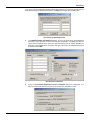
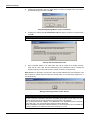
Select Authorize License from the Actions menu, and enter the provided Site Key number in
the ProcessView License Authorization dialog box to activate the license, as shown in the
figure below.
ProcessView License Authorization
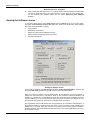
In the License Utility, begin the process of obtaining your site key by selecting Register for a
License from the Actions menu. This opens the Registration Method dialog box, as shown in the
figure below.
Selecting a Registration Method
Express Web Site Registration via Internet
If your PC has access to the Internet, select Express Web Site Registration Via Internet to link to
the Smar Registration Web Page, as shown in the figure below. Now you can specify the products
to be installed on your PC.
Selecting a Registration Method
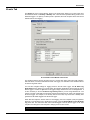
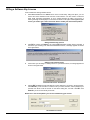
If the Express Web Site method is selected, the License Utility launches the ProcessView License
Authorization dialog box, shown in the figure below, to prepare for acceptance of a Site Key
provided by the Registration Web Page. The License Utility also launches the Smar Registration
Web site. Return to the ProcessView License Authorization dialog box and copy the Site Code to
the Windows Clipboard (highlight the Site Code field and press CTRL+C) for later use on the Web
site.
21