1
Table of contents
Contents of package . . . . . . . . . . . . . . . . . . . . . . . . . . . . . . . . . . . . . . . . . . . . . . . . 3
GuardCam LED Motion Light with Video Camera . . . . . . . . . . . . . . . . . . . . . . . 4
Installation and replacement of back up batteries . . . . . . . . . . . . . . . . . . . . . 4
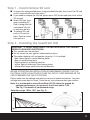
Step 1 - Insert/remove SD Card . . . . . . . . . . . . . . . . . . . . . . . . . . . . . . . . . . . . . . 5
Step 2 - Installing the GuardCam LED . . . . . . . . . . . . . . . . . . . . . . . . . . . . . . . . . 5
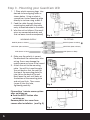
Step 3 - Mounting the GuardCam LED . . . . . . . . . . . . . . . . . . . . . . . . . . . . . . . . 6
Step 4 - Adjusting the settings . . . . . . . . . . . . . . . . . . . . . . . . . . . . . . . . . . . . . . 7
Step 5 - Setting the Date and Time and Video Mode . . . . . . . . . . . . . . . . . . . 9
Step 6 - Viewing Video . . . . . . . . . . . . . . . . . . . . . . . . . . . . . . . . . . . . . . . . . . . . 10
Technical Specifications . . . . . . . . . . . . . . . . . . . . . . . . . . . . . . . . . . . . . . . . . . . 10
General Information and Safety . . . . . . . . . . . . . . . . . . . . . . . . . . . . . . . . . . . . . 11
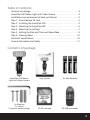
Contents of package
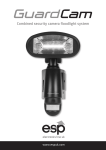
GuardCam LED Motion
Light with Video Camera
1 x Allen key
2 x screws
2 x plastic masonry plugs
User Manual
3 x AAA batteries
2G SD card and
SD USB card reader
3