1
Manager Guide
3 = How to Authorize engineer access
Should you require the manager to authorize Engineer access. It is accessed directly form Day
mode via the Manager code.
LCD Remote Keypad:
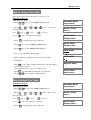
• Enter Manager program mode
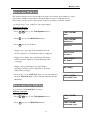
Press PROG 0 1 2 3
•
•
•
MANAGER MENU
Setup Codes?
Press 3 key to require the Manage to authorize Engineer
access.
Press PROG to accept. It will give a 3hr window to operate
the Engineer operation mode.
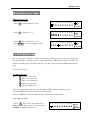
Press
PROG
MANAGER MENU
Authorise Engr?
Engr Authorised
for 3 hours
to accept, the accept tone will be generated.
MANAGER MENU
Set Chime Zones?
•
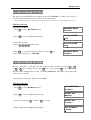
Press RESET to go back DAY mode and within 5 seconds
Input engineer code, authorize into engineer mode 3 hours.
00:26:15 08-Aug
DAY
4 = How to set Chime Zone
If a Security Zone is programmed as Chime, you can hear special tone when it is triggered in
DAY mode.
Note: The zone must be set to security for chime to be set.
LCD Remote Keypad:
Under Manager Menu.
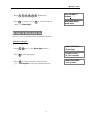
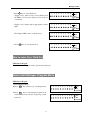
·Press 4 PROG keys go into Set Chime Zone function.
·Select a chime zone, and then press
Note:
1 =zone 1, 2 =zone 2, … 0
·Press
·Press
·Press
OMT
I
or
PROG
RESET
&
PROG
to accept
= zone 10
MANAGER MENU
Set Chime Zone?
CHIME ZONE
Zone 1?
Chime
ON
key to toggle ON/OFF,
to save, or press RESET to cannel. it goes to next zone.
to return to Manager menu.
11
CHIME ZONE
Zone 2?