1
Configuration and web interface
The GOOSE control block reference is constructed with the IED name. The VLAN-ID and priority in
the VLAN tag can be set. The timing parameters for the retransmission can be set. The retransmission
strategy is fixed: a geometric progression with a factor of 2.
Information about the published GOOSE is displayed as well in the Status section. The dataset
information of the currently published GOOSE is a compacted display, with 0 for the False and 1 for
the True value. The rightmost number refers to binary input 1, the leftmost to binary input 8.
7.7
Custom GOOSE configuration
Besides using the default configuration, the ISIO 200 can be configured to subscribe to and to publish
arbitrary GOOSE messages. Such a custom GOOSE configuration is set up by using the GOOSE
Configuration module which is part of the OMICRON Test Universe software.
The GOOSE Configuration module was made for the CMC test sets. Part of the terminology used in
this module refers specifically to this application. To use this module for setting up a configuration for
an ISIO 200, some important differences have to be kept in mind.
To use the GOOSE Configuration module it must be installed with the OMICRON Test Universe
software. For the details of using the GOOSE Configuration module see the related documentation.
GOOSE configuration for a CMC test set
The intended use of the GOOSE Configuration module is to set up CMC test sets. The details
explained here are provided only to point out the differences to be regarded when using the module
with the ISIO 200.
Typically, a CMC is not publishing GOOSE messages for its own purpose. Mostly, the CMC publishes
"on behalf" of another protection or substation automation device to mimic some part of the behavior
of that device. Therefore, the publishing functions of the CMC are configured in the Simulations tab.
The data attributes from subscribed GOOSE messages operate the (virtual) inputs of the test set.
The (virtual) outputs of the test set manipulate the values of data attributes in simulated (published)
GOOSE messages.
When using the GOOSE Configuration module for configuring an ISIO 200, part of the context needs
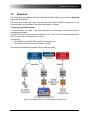
to be reversed. The following figure illustrates this.
Figure 9:
Relation of Subscription & Publishing (Simulation) with CMC and ISIO 200
21