1
13.3 DSP To Local Aperture 0 control and Accessing
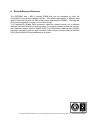
The quickest way to transfer information from the DSP to CompactPCI Bus or vice
versa is to use the Local-to-CompactPCI Aperture 0 in the CompactPCI Bridge
device. A DSP unit may be required to transfer large amounts of acquired data to the
PC host for data storage or post-processing etc. Allowing the DSP to take control of
the CompactPCI bus means that the HOST only requires to transfer data, from an
internal allocated region of memory, after the transfer has been completed by the
DSP. Alerting the Host that data has been transferred can be accomplished in a
number of ways i.e. writing to the mailbox register, which can then generate an
interrupt.
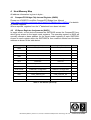
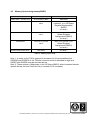
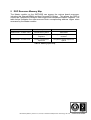
The Local-to-CompactPCI Aperture 0 is mapped as a region of addressable space
from 0x1800 0000 – 0x183F FFFF (words), as shown in Table 4, section 5.
There are a number of registers in initialise before data can be read or written via this
address space.
• Unlock the CompactPCI Bridge System register. This requires a write to the
LB_CFG_SYSTEM (offset 0x78, BAR 0) with the value 0xA05F.
• Write the upper 8 bits of your destination address (in bytes) to the upper 8 bits
of the 32-bit Local Bus to CompactPCI Map 0 register (LB_MAP0_RES, offset
in bytes 0x5c ).
• Convert you lower 24-bit address to a word aligned value.
• Write/Read data from Local-to-CompactPCI Aperture 0 .
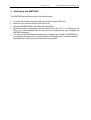
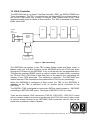
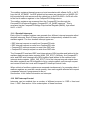
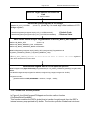
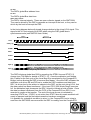
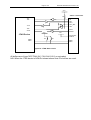
The diagram below illustrates this procedure.
In the example below the WritetoCompactPCIregisters(offset,data) function writes
data over the DSP’s Global bus, at a base address of 0x1800 0000 (words), the first
parameter passed to this function in the offset address in words, and the second is
the data to be written.
User Manual (QCF42); Version 3.0, 8/11/00; © Sundance Multiprocessor Technology Ltd. 1999