1
General Information———————— 7
Phone Models Covered
Network Services
Sonim Support Information
Use the Guide Effectively
Contents
Your Safety Guidelines———————— 9
Battery Performance
Battery Replacement
Avoid Short Circuit
Avoid High Temperatures
Battery Disposal
Personal Medical Devices
Child Safety
Emergency Calls
SAR Information
Getting Started with Sonim XP5560 BOLT 2 IS—— 14
Battery Usage
Inserting the Battery
Charging the Battery
Set Battery Alert
Your SIM Card
Inserting the SIM Card
Removing the SIM Card
Switching On
Home Screen
Key Shortcuts in Home Screen
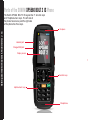
Keypad Functions
Your SONIM XP5560 BOLT 2 IS———————— 25
Main Menu
Main Menu Icons
Home Screen Indicators
Key Operations without Your SIM Card
Understanding Lone Worker
Application———————— 29
Display Indicators for Lone Worker Application
Raising Alarms
Understandinfg Lone Worker
Application———————— 30
Lone Worker Usage Recommendations
Managing Calls———————— 31
Dial a Number
Dial an International Number
Dial a Number via Contacts
Making a PTT Call from Contacts
Dial a Number via the Call History
Managing Call History
Call Timers
Call Settings
Auto Answer
Any key Answer
Call Waiting
Caller ID
Call Forwarding
Call Barring
Advanced Settings
Receive a Call
Record a Call
Call Restrictions
Managing Phone Settings———————— 36
Time and Date Settings
Schedule Power On/Off Settings
Language Settings
Display Settings
Customizing Dedicated Keys
Managing Speed Dial Numbers
Power Saving Settings
Auto Keypad Lock
Firmware Details
Managing Network Settings———————— 38
Network Selection
3