1
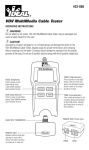
PROFINET Cable Tester – User Manual Plug one end of the cable into main unit and the other end of cable into the remote unit. Fig. 4 - Cable attached to the Main and Remote Unit If PROFINET cable is tested, switch the split pair test OFF!!! ) Press the DATA/SEL button for 3 seconds to switch split pair OFF (every time the button is pressed for 3 seconds, split pair operation is toggled). By default the cable tester is set to split pair is ON! To start testing press the DATA/SEL button. ) Press DATA/SEL for 2 seconds to switch between DATA1: 8 wires (4 pairs) testing and DATA2: 4 wires (2 pairs) testing. By default the cable tester is set to DATA2! Results are invalid if a cable is attached during a test in progress! ) To switch the cable tester OFF, press the VIDEO button. PN1-Manual-EN.docx _______________________________________________ Version 1.2 – 27 April 2009 Page 12 / 32 © PROCENTEC 2009 - Copyright - all rights reserved