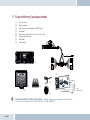
1
6 Installation instructions
6.1
Required configuration
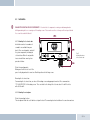
Before installation of your EGO LOOK, please note which features and connection options are provided by your car audio
system. It is advantageous when your audio has the following: a muting function, phone input and line-in. You can find out
which of these input options your audio system has in the documentation provided.
6.1.1 Vehicle
The EGO LOOK may only be installed in vehicles with 12 V, with the negative terminal connected to the chassis. If no car
audio is installed, an add-on speaker will be required. For the installation of the optional charging cradle, you will require a
model-specific mounting that may be purchased from a specialist dealer
6.1.2 Mobile phone
Operation of the EGO LOOK requires a Bluetooth®-compatible mobile phone. You can find a list of supported Bluetooth®
telephones online at www.fwd-online.de.
6.1.3 Muting (radio mute switch)
The muting function (Radio Muting) ensures that the audio sound is turned off during telephone calls. The system
supports the muting function. Your car`s audio documentation will show whether your car audio has a mute option. If your
car audio is not equipped with a muting option, you can install the optionally available Stereo Mute Box to facilitate speaker
muting.
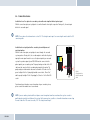
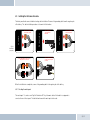
6.1.4 Converting the EGO LOOK into a previously installed Funkwerk hands-free car kit
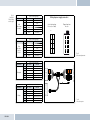
An adapter cable is available for customers who already own a Funkwerk hands-free car kit (including the Audio 2000,
3000, Audio blue, Audio com, and Audio compact) and who would like to easily convert the EGO LOOK. The adapter cable
connects the EGO LOOK with the ISO cable already installed in your car with your Funkwerk hands-free car kit.
q
NOTE! This simple converting option is only possible when installing the EGO LOOK without a stereo mute box. To install the
EGO LOOK with the stereo mute box, the stereo mute box’s ISO connecting cable should be used to connect to the vehicle.
8
|9