1
User’s Manual
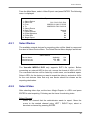
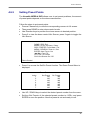
From the Main Menu, select <Video Export> and press ENTER. The following
menu is displayed.
Video Export
1. Select Device
2. Select Ch:
3. From
4. To
5. Select Events
6. Data Type
7. Export Format
8. Digital Signature
9. Erase Disc
10. Begin Export
4.5.1
CH1 CH2 CH3 CH4
2005/03/19 AM 07:50:05
2005/03/28 PM 03:09:18
Normal
DRV
No
No
No
Select Device
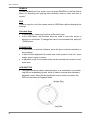
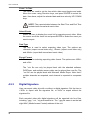
The available external devices for exporting video will be listed by name and
free size in Select Device Menu. The Select Device Menu displays as follows.
Select Device
Device Name
xxx-xxx-x-x-xx
xx-xxx-xx-xxxx
Available
256 MB
1.5 GB
Sel
No
No
The Versatile MPEG-4 DVR only supports EXT3 file system. Before
connecting an external HDD to the unit, ensure the format of HDD is EXT3.
The connected devices will be listed by model name, and available space.
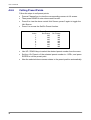
Select <YES> for the device you want to export the video to, and select <NO>
for the rest devices. Note that only one device should be chosen as the
exporting destination.
4.5.2
Select Video
After selecting video clips, set the item <Begin Export> to <YES> and press
ENTER to start exporting. Following are the items for selecting video.
Select Channel
Select the channel that the administrator wants to export. Move the
cursor to the wanted channel using LEFT / RIGHT keys, select or
de-select a channel by pressing ENTER.
29