1
IP CAMERA User Manual
Features
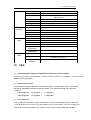
Hardware
Interface
Physical
Index
Software(PC
Side)
Dual way audio
Motion Detection
Triggered Actions
User Setting
Date/ Time Setting
Upgrade
support
support
Email/FTP/external alarm/send message to
alarm server
Three levels
support
Upgrade from network
DDNS
Ethernet
A free DDNS provided by manufacturer
10Base-T/100base-TX
Alarm In
Alarm Out
Audio In
1 way
1 way
Internal Mic and External Mic interface
Audio Out
Weight
Main body
Power
Power consumption
Operating
temperature
Operating
temperature
OS Supported
Audio Line-out interface x 1
343g
111mm(L)*107mm(W)*148mm(H)
DC 5V
<6W
0℃~ 45℃
Browser
Application
Software
10
1)
10% ~ 80% non-condensing
Microsoft Windows 98/2000/XP/Vista
Internet Explorer6.0 and Above or Compatible
Browser, Firefox etc.
IPCMonitor
FAQ
Unmatched power adapter will damage the equipment or power adapter
When plug in the power adapter , please check carefully the voltage , it should be 5V
adapter for this equipment.
2)
Slowly browse speed
This equipment adopts MJEPG compression format, it needs large network bandwidth,
the narrow bandwidth will affect the browse speed . The typical bandwidth uses situation
as below:
640x480@10fps : 4.0 Megabits ~
5.0 Megabits
320x240@30fps : 1.2 Megabits ~
1.6 Megabits
3)
Color difference
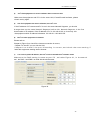
The default is infrared lens, when visit outdoor or strong infrared light scenes, there are
color differences, the color is not accordance to the real scenes. User can change it to
color lens to solve this problem, but color lens can only use under the daylight situation.
24