1
Amplicon Computer user manual
Amplicon Computer user manual
Contents
Safety Instructions
03 Safety Instructions
36 Impact-E 72 / 73
Before you unpack your PC system, ensure you carefully read through this manual and
03 Operation of your PC
37 Impact-S IP CCTV Storage Servers
follow any related safety or operational instructions.
04 Electrostatic Discharge Damage
38 Impact Server 2000 Series
04 Rack Mounted Equipment
39 Impact Server 4000 Series
05
40 Impact Server 6000 Series
06 Additional Hazards
41 Maintenance
Before commencing work within the PC ensure that the mains is disconnected from the
07 Introduction
42 End of Life Battery Removal
PC and any attached peripherals.
08 Unpacking the system
09 Installation
10 Fitting ISA, PCI and PCI express Cards
Only suitably qualified and experienced personnel should work inside the computer.
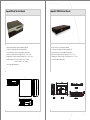
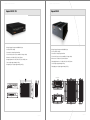
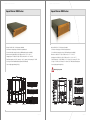
Instructions
43 Product Repair / Returning a Unit
to Amplicon
11
44 Terms and Condition
12 Impact-E - Accessories
45 End of Life Processing
Operation of your PC
13 Upgrading and Expanding the
Before operating your computer please: -
14 Impact-E Series
15 Regulatory Compliance
Read the equipment ratings plate and ensure that the mains circuit is suitably rated to
16 Specifications
power the equipment to avoid risk of overloading. Do not use mains adaptors, or
17
extenders.
18 Mechanical Specifications
18 Ventrix Range
Ensure that any cables connecting to the equipment are made safe and do not present a
19 Ventrix 1xxx Series Chassis
tripping hazard.
20 Ventrix 2xxx Series Chassis
21 Ventrix 4xxx Series Chassis
To avoid risk of electric shock ensure that equipment is plugged into a suitably grounded
22 Ventrix 6xxx Series Chassis
mains outlet. Only use the power cord supplied with your PC. Do not continue to use the
23 Ventrix-W 4xxx Series Chassis
cable if it is cut or damaged
24 Ventrix 5xx Series Chassis
25 Impact / Impact-R
Ensure the chassis is kept away from heat sources, such as radiators and heating vents.
26 Impact / Impact-R 2xxx Series Chassis
27 Impact / Impact-R 3xxx / Impact-S
Chassis ventilation slots must be kept clear and not blocked. Failure to do so is likely to
3000 Series Chassis
cause the unit to overheat and become unstable.
28 Impact / Impact-R 4xxx Series Chassis
29 Impact-R 15xF Series Chassis
Avoid connecting the PC to an electrical supply which may have unacceptable
30 Impact-R 2xxF Series Chassis
interruptions, surges, spikes or noise. We recommend the use of an uninterruptible power
31 Impact-R 1000F Range
supply (UPS), surge protector or mains conditioner to address the issue.
32 Impact-E Range
33 Impact-E 100
34 Impact-E 30 / 35
35 Impact-E 42
Page 02
Page 03