1
Using Your Booth - 31
Using Your Booth
When connected to the T-Max® Manager or T-Max® 1A or 3A.
WARNING
A
Wear protective eyewear.
Failure to may result in severe burns or
longterm injury to the eyes.
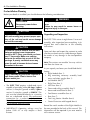
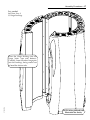
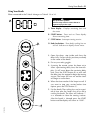
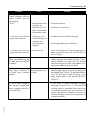
A Timer display - Displays remaining time and
fan status.
B START button - Turns unit on. Timer display
shows remaining time.
C STOP button - Interrupts tanning session.
D Body fan buttons - Turns body cooling fans on
and off. Indicator on display shows status.
B
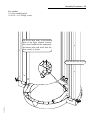
1. Open the doors, step inside and close the
doors fully. For best results, position your body
in the center of the booth.
2. Put on your safety goggles.
D
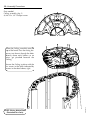
3. Assuming the remote system has been set to
allow a pre-tanning delay time, the timer display (A) will count down the remaining delay
time. Press the START button (B) or wait until
the delay time has expired to begin the tanning
session. The lamps will turn on and the timer
will begin to count down.
4. When the timer reaches 0 the lamps turn off. If
you want to stop your session before time
expires, press the STOP button (C).
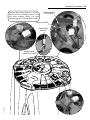
5. Exit the booth. The cooling fans run for a period of time after the lamps shut off to aid in
cooling the booth. The timer will indicate “:”
as a reminder to clean the tanning surfaces.
After the booth is cleaned, press the START
button and the display will return to “0:00”.
27342-01A
C