1
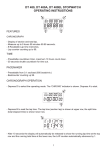
CR2032 POSITIVE
METAL CONTACT
RESET KEY
Fig. 1
Clock Mode and Display Contrast:
Press MODE key to switch to clock mode as shown in Fig. 2.
The display contrast can be adjusted for your best viewing by pressing ⇐ or ⇒ keys.
Week date
Date
Month
Year
AM/ PM
Hour
Minute
Second
Fig. 2 Clock display
Clock setting:
1.
2.
3.
Press [SET/ RESULT ]in clock mode to enter clock setting mode.
Press [1] to select 12hr clock display format or [2] for 24hr format.
After 12/24 hr selection, the display will flash for entering date, month, year, hour, minute,
second and AM/PM (if 12hr format was selected). Enter 2 digits for all settings, for
example, to set date press ‘01’ for 1stday of the month while it is blinking. The blinking digits
will move automatically to the next digits i.e. ‘month’. To go back, press ⇐ key or press ⇒
key to skip to the next setting. If 12Hr clock display format is selected, press any numerical
key to switch between AM/PM while it is blinking. The Timer will return to clock mode after
AM/PM selection or press [MODE ] key anytime during settings.
The Timer will return to Clock mode automatically if left for 1 minute.
Linkgate unit connection:
The Linkgate unit is designed for interconnecting the Lane Timer and lane buttons. To connect
the Linkgate unit to the timer insert one end of the Linkgate cable into the terminal marked with
2