1
Table of Contents
Introduction............................................................................................................... 2
Interface Explanation.................................................................................................3
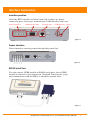
Interface position.............................................................................................................3
Power Interface................................................................................................................3
RS232 Serial Port..............................................................................................................3
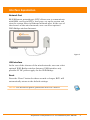
Network Port....................................................................................................................4
USB Interface................................................................................................................... 4
Reset................................................................................................................................ 4
Hardware Installation................................................................................................ 5
Preparation...................................................................................................................... 5
Selecting an Installation Location for the ECU.................................................................5
Cable Connections........................................................................................................... 7
Internet Connection.........................................................................................................7
Connect the AC Power Line..............................................................................................8
ECU Initialization Sequence.......................................................................................9
Step 1: Power on ECU...................................................................................................... 9
Step 2: ECU time zone setting........................................................................................11
Step 3: EMA Monitoring................................................................................................ 11
Basic Operation........................................................................................................12
Menu Structure..............................................................................................................12
Restore the factory set operation.................................................................................. 14
Troubleshooting............................................................................................................. 14
Local Network Interface.......................................................................................... 15
Connecting to the ECU via the LAN................................................................................15
Connecting Directly to the ECU......................................................................................15
Home Screen..................................................................................................................17
Real-time Data Screen....................................................................................................18
Configuration Screen..................................................................................................... 18
Administration Screen....................................................................................................20
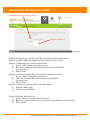
Remote ECU Management (EMA)........................................................................... 26
ECU Configuration/ECU Status Page..............................................................................27
Setting the ECU Time Zone............................................................................................ 28
Managing Inverter IDs and Updating the Inverter ID List..............................................28
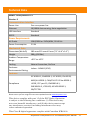
Technical Data.......................................................................................................... 30
APsystems Three-phase ECU-3 V3 Installation/User Manual
1