1
6/27/2003
QUESTIONS AND ANSWERS
1. How do I begin the sampling process?
• The first step to initiate the sampling process is to create a “profile.” A profile specifies
the criteria for sampling operating ledger transactions. The Controller’s office has
created a “global profile” for the campus rollout, which all participating units will use.
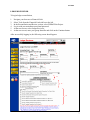
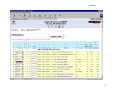
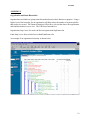
• The next step begins after the ledgers have been closed. Go to the “Ledger Reviewer”
screen and identify the accounting period to be reviewed, and enter information in one
or more of the primary lookup fields (Index, fund, organization, program, project,
account, etc).
• In “Ledger Reviewer” you also have the opportunity to indicate under “Transaction
Samples Review” if the sampled transactions should be shown by userid or by groupid.
All sampled transactions can be shown, or only not reviewed and noncompliant
transactions will be shown. Indicate your preference by checking the appropriate box.
• “Submit Form” to view sampled transactions.
• Review all sampled transactions and indicate each transaction status with an “ok” or a
problem code indicating an error.
• Correct errors by initiating appropriate correction (ENPET, check adjustments, etc.)
• Once errors are corrected, return to original transaction and mark “ok”.
2. Are all transactions to be reviewed during the month end reconciliation process part
of the sample?
For the most part, all transactions that will need to be reviewed will be in the set of
sampled transactions. Further review may be required for grants that are closing. For best
practices, it is recommended that all transactions are reviewed 100% within the last 90
days of the award.
3. Can we review more than the sampled transactions?
With the exception of grants that are ending or have already ended, every effort should be
made to only review the sampled transactions according to the global profile (see
question #7 for further explanation of global profiles). We will explore the option of
having departments create their own profiles to target specific kinds of transactions in the
future once we have sufficient data from the rollout.
4. When can I begin to review the sampled transactions?
Sampled transactions are available for review once the month-end ledger has closed.
Transactions above $2500 are sampled at 100%; these transactions can be reviewed
before the ledger closes and the sampled transactions are chosen. Use the Ledger
Reviewer and mark the status code for each transaction above $2500.
5. Do all transactions in the sample need to be reviewed?
Yes. All transactions in the sample must be reviewed and an “ok” designation indicated if
no error found. If an error is determined, the appropriate problem code should be
designated.
3